

Overview
The Behavior Analysis tool automatically classifies time series data into recognizable patterns using statistical model comparison. Whether you’re analyzing simulation outputs, historical data, or exploring synthetic patterns, this tool provides instant insights into the underlying behavior of your data.Core Technology
Partnership with BEAMS
This behavior analysis capability was developed in partnership with the BEAMS (Benchmarking and Evaluating AI for Modeling and Simulation) project, which includes members of the system dynamics community and technical committee. The BEAMS project focuses on advancing AI applications in system dynamics and model-based analysis. For more details about the BEAMS project, visit: https://www.buffalo.edu/ai-data-science/research/beams.html This tool is part of the open source SD-AI project. The complete codebase and documentation can be found at: https://ub-iad.github.io/sd-ai/Statistical Pattern Detection
The analyzer uses model selection to compare multiple behavioral models and identify the best fit:- Model Competition: Multiple pattern models compete to explain your data
- Automatic Selection: Best-fit model chosen based on statistical likelihood
- Confidence Scoring: Probability weights show detection confidence
- Robust Normalization: Z-score normalization for scale-independent analysis
Detected Behavior Patterns
The analyzer can identify 12+ distinct behavioral patterns commonly found in system dynamics and time series data:Growth & Decline Patterns
Cyclical Patterns
Transition Patterns
Stability Patterns
Using the Tool
Synthetic Data Mode
Generate and analyze preset behavior patterns: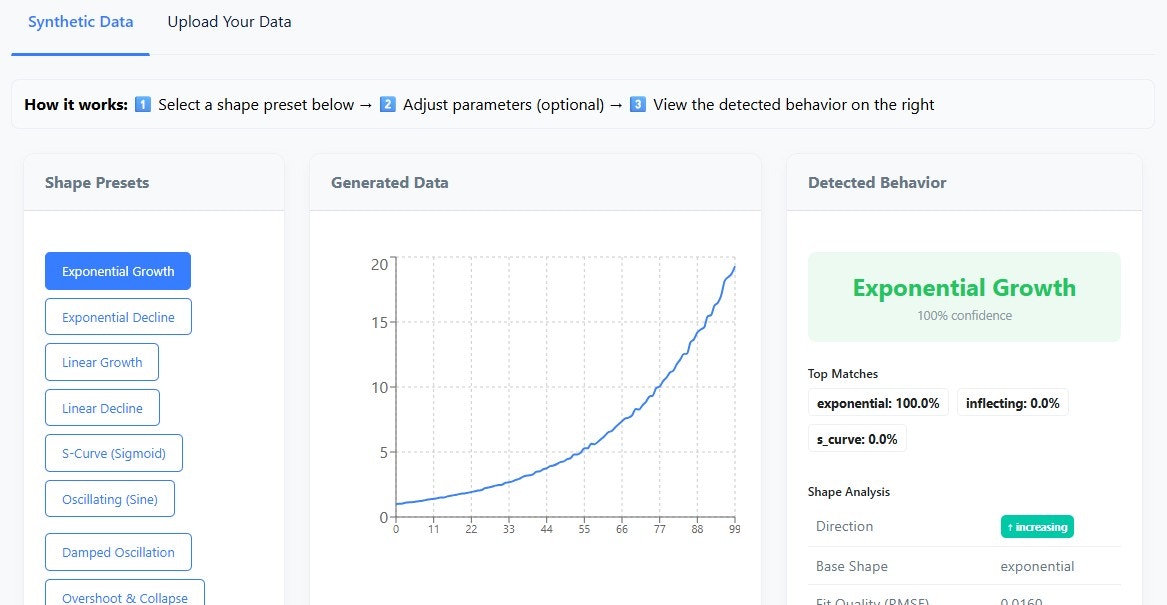
- Select a Pattern: Choose from the pattern library dropdown
- Adjust Parameters:
- Number of points (10-500)
- Noise level (0-50%)
- Amplitude, frequency, growth rate
- View Results: See instant classification with confidence scores
Upload Your Data
Analyze your own CSV files: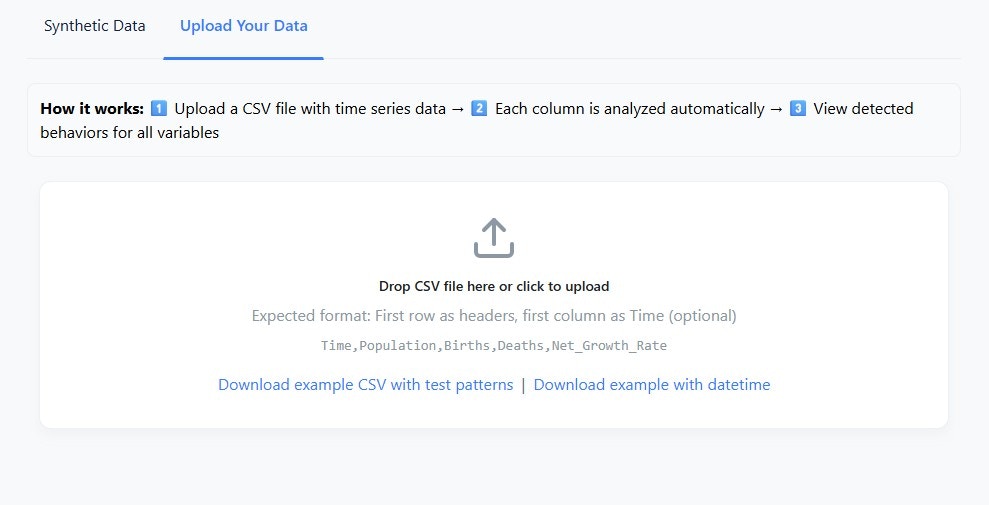
- Drag and Drop: Drop a CSV file onto the upload area
- Format Requirements:
- First row must contain column headers
- Each column is analyzed as a separate variable
- Optional: Include a “Time” or datetime column
- Multi-Variable Analysis: All numeric columns analyzed simultaneously
CSV Format Examples
Simple numeric data:Understanding Results
Confidence Interpretation
Scale Statistics
The analyzer provides comprehensive scale metrics:- Mean, Std, Min, Max: Basic distribution statistics
- Range: Total variation in the data
- Start/End Values: First and last observed values
- Delta & Delta %: Absolute and percentage change
- Direction: Overall trend (increasing/decreasing/stable)
- R²: Linear fit quality (how well a line fits)
- Correlation with Time: Trend strength
Handling Edge Cases
Complex or Unmodeled Patterns
Complex or Unmodeled Patterns
If the shape RMSE is high (above 0.85), the analyzer flags the result as “Possibly Complex or Unmodeled”. This indicates the data may have:
- Multiple overlapping patterns
- Non-standard behavior
- High noise levels
- Structural breaks
Near-Zero Data
Near-Zero Data
Data close to zero is automatically detected and classified as “Inactive” when appropriate, using absolute thresholds rather than relative measures.
Flat Data
Flat Data
Constant or near-constant data is detected using coefficient of variation (CV below 0.1) and classified as “Stable”.
Use Cases
Model Validation
Compare your simulation outputs against expected behaviors:- Verify exponential growth models produce exponential patterns
- Confirm oscillating systems show proper dampening
- Detect unexpected step changes or transitions
Data Exploration
Quickly characterize unfamiliar datasets:- Identify dominant patterns in historical data
- Screen multiple variables for interesting behaviors
- Find cyclical patterns in operational data
Teaching & Learning
Understand system dynamics archetypes:- Generate synthetic examples of each pattern
- See how parameters affect behavior
- Learn pattern recognition visually
Technical Details
Performance
- Analysis Time: Typically under 1 second per variable
- Memory: Runs entirely in browser memory
- Data Limits: Optimized for series up to 10,000 points
Supported Formats
- CSV files with numeric columns
- Optional datetime column (auto-detected)
- Missing values handled via linear interpolation
The behavior analysis tool uses the same Pyodide runtime as the simulation engine, so if you’ve run a simulation, the Python environment is already loaded.